This folio documents how Student Time Planner was designed and built — an AI-assisted weekly study planner that helps students know what to do and when, using Next.js, TypeScript, MongoDB, and Gemini.
Contents
Problem definition
Senior secondary students juggle school, homework, sport, and social commitments in the same week. A major reason work does not get done is not a lack of intention — it is the friction of starting: deciding what to do next, when it fits, and how to recover when a plan slips. Paper planners and generic calendar apps still leave that planning burden on the student. They require repetitive data entry, do not understand fixed school blocks versus movable study, and rarely help when a task overruns or is missed.
Student Time Planner addresses this need with an AI-assisted week view. Students talk to the planner in plain language (“add an hour of English tonight”) or upload a photo of their printed school timetable so subject blocks appear as fixed, recurring activities. The system treats school and sport as immovable by default, marks overdue incomplete tasks clearly, and validates every AI change before it is written so the calendar stays consistent. The opportunity is a low-friction product that students will actually open — a guide for the week, not another empty grid to fill by hand.
Functional requirements
| ID | Requirement description | Priority |
|---|---|---|
| FR1 | Users can sign in with a one-time email code (or demo account) and sign out; sessions are cookie-based. | High |
| FR2 | Users see a Monday–Sunday week view with working hours, today highlighted, and a live now-indicator. | High |
| FR3 | Users can create, edit, complete, delete, and reschedule tasks and activities (tasks only are completable). | High |
| FR4 | Users can edit the calendar via natural language through the command bar (AI proposes validated operations). | High |
| FR5 | Users can upload a timetable image, review extracted blocks, and confirm before save. | High |
| FR6 | Recurring items expand into weekly occurrences; exceptions skip dates without orphan duplicates. | High |
| FR7 | Split-session tasks render as one logical item across multiple time blocks. | Medium |
| FR8 | Each user’s items are private; queries are scoped to the authenticated user id. | High |
| FR9 | Overdue incomplete tasks are visually distinct (orange) with a reschedule path. | Medium |
| FR10 | Project documentation covers planning, design, algorithms, and automated tests. | High |
Non-functional requirements
| Category | Requirement |
|---|---|
| Security | Signed JWT session cookies; one-time login codes; Zod validation on all writes; no cross-user data access; secrets only in environment config. |
| Performance | Week expansion is in-memory for the visible week only (not full history). Target: cold week render under ~2s on a school laptop; AI round-trip under ~8s for a typical prompt; npm test suite under ~5s. Images processed only on upload; AI apply is all-or-nothing so failed batches do not leave partial writes. |
| Usability | Week-first UI, plain-language command bar, review step for timetable import, consistent accent colour and status colours. |
| Accessibility | Semantic structure, keyboard-reachable controls where practical, readable type sizes, colour not the only cue for completed vs overdue. |
| Portability | Runs on any laptop with Node.js and npm; dependencies declared in package.json. |
| Maintainability | TypeScript modules by concern (auth, calendar, AI, db); single Zod source of truth; automated Vitest suite for calendar core. |
| Reliability | Malformed AI output is rejected; immovable activities are not shifted by bulk reschedule unless explicitly requested. |
Storyboard
The storyboard is a UML activity diagram of the main student journey. Rounded rectangles are actions; diamonds are decisions; filled dots are merge points; the solid circle is the start and the bullseye is the end. Authentication always reaches Load week view (after an email code if needed). From Choose next action the student picks AI (validate then all-or-nothing apply, or clarify and retry), timetable photo (confirm or cancel), UI edit, or change week (reload). Successful AI / photo / UI paths merge, refresh the week, then either continue or sign out.
Financial feasibility
The target users are secondary students who need a planner they can afford. Existing tools (Google Calendar, Notion, study apps) do not combine free school-timetable photo import with validated AI scheduling around immovable school blocks. Student Time Planner is designed to run on a low ongoing cost so the product can stay free for students, or charge a low optional fee that still undercuts typical productivity subscriptions.
| Cost item | Initial | Ongoing | Notes |
|---|---|---|---|
| Developer time | See opportunity cost | $0 cash | Own labour |
| Hosting (Vercel hobby / local) | $0 | $0–$20 / month | Local run is enough for demos |
| MongoDB Atlas M0 | $0 | $0 / month | Free tier for early users |
| Resend email | $0 | $0 / month | Free tier for login codes |
| Google Gemini API | $0 | $10 / month | Token budget for NL + timetable vision |
| Domain name | $23 / year | $23 / year | Custom URL for the live product |
Funding sources: own unpaid labour for build time; vendor free tiers (Vercel, MongoDB Atlas M0, Resend) for early hosting/auth; personal funds for Gemini tokens and the domain. No external investors or school budget are required for a class demo or a small pilot.
Cash operating cost (steady state): about $10/month for Gemini plus $23/year for the domain → roughly $12/month all-in (domain averaged). Annual cash burn ≈ $143 (12 × $10 + $23).
Opportunity cost: at a bakery wage of $25.50/hour, about 70 hours of design and development equals $1,785 forgone wages. That is the main economic cost of producing the software.
Break-even analysis
Monthly cash burn is treated as $12. If the product stays free for students, break-even in cash terms is already met once free-tier limits hold — the remaining question is whether the builder accepts the $1,785 labour cost as assessment/portfolio investment.
If an optional student subscription is introduced at $3/month (well below typical Notion/AI tool pricing):
| Paying users | Monthly revenue | Vs $12 burn | Result |
|---|---|---|---|
| 4 | $12 | Covers burn | Cash break-even |
| 20 | $60 | +$48 | Tokens + small buffer |
| 50 | $150 | +$138 | Room for paid DB if needed |
| 200 | $600 | +$588 | Comfortable operating margin |
Break-even users = monthly burn ÷ price = 12 ÷ 3 = 4 paying students. That is a realistic pilot size for one school cohort. Commercial alternatives already exist for generic calendars, but not as a free, timetable-photo + validated AI week guide aimed at Australian secondary students — so the opportunity remains financially feasible for the target user and viable to operate at low scale.
Dataflow diagram (DFD)
Level 1 data flow diagram for Student Time Planner. Circles are processes, open-sided rectangles are data stores, closed rectangles are external entities, and labelled curved arrows show data moving between them.
Data dictionary
Each stored field is listed with its type, display format, sizes, purpose, example, and validation rules.
| Variable | Data type | Format for display | Size in bytes | Size for display | Description | Example | Validation |
|---|---|---|---|---|---|---|---|
| userId | String | XX..XX | 24 | 24 | Primary key identifying the signed-in user (Mongo ObjectId hex or demo id). | demo-user | Required; non-empty |
| String | XX..XX | 64 | 64 | Login email for one-time codes. | sam@school.edu | Valid email; stored lower-case | |
| itemId | String | XX..XX | 24 | 24 | Primary key for a calendar item. | 507f1f77bcf86cd799439011 | Unique; required |
| type | String | XX..XX | 8 | 8 | Whether the item is a task or an activity. | task | Must be task or activity |
| title | String | XX..XX | 200 | 40 | Display name on the calendar card. | English essay | Length 1–200 |
| color | String | #NNNNNN | 7 | 7 | Hex colour for the card. | #66AA3C | Regex ^#[0-9A-Fa-f]{6}$ |
| movable | Boolean | X | 1 bit | 1 | Whether AI may freely reschedule the item. | N | true/false; activities default false |
| segmentStart | Date and Time | YYYY-MM-DD HH:mm | 4 | 16 | Start of a one-off time block (ISO stored). | 2026-07-22 19:00 | Valid datetime with offset |
| segmentEnd | Date and Time | YYYY-MM-DD HH:mm | 4 | 16 | End of a one-off time block. | 2026-07-22 20:00 | Must be after segmentStart |
| freq | String | XX..XX | 8 | 8 | Recurrence frequency. | weekly | daily or weekly |
| byWeekday | Array (Integer) | N,N,… | 7 | 13 | Luxon weekdays the series repeats on (1=Mon … 7=Sun). | 1,2,3,4,5 | Each value 1–7; weekly needs ≥1 |
| timeStart | String | HH:mm | 5 | 5 | Local start time for a recurring series. | 08:30 | Valid HH:mm; before timeEnd |
| timeEnd | String | HH:mm | 5 | 5 | Local end time for a recurring series. | 15:00 | Valid HH:mm; after timeStart |
| interval | Integer | N | 1 | 1 | Week stride (2 = Week A/B fortnight). | 2 | Integer 1–4 if set |
| exceptions | Array (String) | YYYY-MM-DD | 10 * n | 10 | Dates skipped in a recurring series. | 2026-07-22 | Each entry valid yyyy-MM-dd |
| completed | Boolean | X | 1 bit | 1 | Whether a task is done. | Y | Only allowed when type = task |
| loginCode | String | NNNNNN | 6 | 6 | One-time sign-in code (hashed at rest). | 482193 | Exactly 6 digits; short TTL |
UML class diagram
ER diagram
Logical entity–relationship view of the MongoDB collections. Each item belongs to one user; login codes are short-lived auth records.
Research and selection of development approach
Choosing how to organise a multi-week software project matters as much as choosing a framework. Three common approaches taught in software engineering are Waterfall, Agile, and WAgile (a hybrid of Waterfall planning with Agile delivery). This section compares them by project scale and workflow, cites real-world practice, then justifies the approach used for Student Time Planner.
Waterfall
Waterfall sequences requirements → design → implementation → testing → deployment as largely one-way stages. Documentation is front-loaded: the problem, data model, and interfaces are meant to be “finished” before coding begins. Scale-wise, Waterfall historically suits large, contractual programmes where change is expensive and the problem is relatively stable — defence systems, regulated government platforms, and civil-engineering-style software schedules. Workflow-wise, each stage has a gate; testers receive a build late; feedback that contradicts an early requirement is costly because earlier artefacts are treated as locked.
Case study — UK government / NHS-scale IT (Waterfall-like stage gates): programmes in the 1990s–2000s often ran at large scale — hundreds of staff, multi-year budgets, many agency stakeholders, and fixed procurement contracts. The workflow matched that scale: a signed specification, then gated design, build, and late UAT. Public inquiries into delayed health and benefits systems showed the cost of discovering wrong assumptions only after “requirements complete.” For Student Time Planner that pattern is a poor fit. Scale here is one developer and one product, not a multi-vendor programme. Behaviour is uncertain: Gemini may invent item ids, recurrence edge cases appear only when expanding a real week, and timetable photos vary by school. Locking a complete design before those discoveries would waste time rewriting “finished” documents instead of tightening validation code — the opposite of what Waterfall stage gates assume.
Agile
Agile favours working software every short cycle, continuous backlog refinement, and responding to change over comprehensive upfront documentation. Scale-wise it thrives in small-to-medium product teams that can ship, measure, and pivot — typical SaaS startups and product squads. Workflow-wise, stories are sliced vertically (a thin path through UI, API, and data), demos replace stage-gate reviews, and tests grow alongside features.
Case study — Spotify’s squad model (Agile at product scale): engineering was organised into small cross-functional squads (often under ten people) that owned a vertical slice of the product and released frequently. Scale was medium-to-large overall (many squads), but each squad’s workflow stayed local: backlog → short build → live feedback, without waiting for a company-wide design freeze. That workflow matches the technical risk of this planner — ship auth, then a week view, then AI operations, then timetable import — each slice usable. The weakness for Year 12 is documentary: pure Agile can leave DFDs, algorithms, and requirement tables thin even when the app works. Markers need evidence of planning and design, not only commits, so “Agile alone” would under-serve the folio even if it served the code.
WAgile
WAgile deliberately combines both. A short Waterfall-style front end fixes the problem statement, major functional/non-functional requirements, architecture boundaries, and milestones. Delivery then follows Agile sprints that implement and revise features against that spine. Scale-wise, WAgile targets the middle band: projects too complex for “code first, document never,” but too uncertain for a full Waterfall freeze. Workflow-wise it maps to a fixed school delivery window with Gantt milestones (initiation, core build, AI, polish, documentation) while still allowing daily coding loops and retrospective fixes.
Case study — bank / regulated product teams (hybrid delivery): many financial-product squads keep a written architecture decision record and release train (Waterfall-like spine for audit) while still shipping fortnightly increments (Agile workflow). Scale is larger than a school project but the constraint is similar: a hard external deadline plus mandatory design artefacts. Student/industry assessed projects that must submit design packs alongside demos follow the same hybrid. The comparison on scale is therefore: Waterfall for large stable contracts; Agile for continuous product evolution with light ceremony; WAgile for small teams with a hard deadline and a required design artefact set. Student Time Planner — one developer, feature-rich surface (auth, calendar math, LLM tooling, image import), fixed Term 3 submission — sits squarely in the WAgile band.
Selected approach: WAgile
On scale: one developer, one product, roughly three weeks of intensive build time inside a school term. On workflow: a written spine first (problem, FRs/NFRs, data rules), then short implement–test–adjust loops for each vertical slice. That combination is exactly what WAgile describes, and it is why Waterfall or Agile alone would have been weaker choices for this assessment context.
Upfront, the product overview locked non-negotiable rules: activities immovable by default, tasks only completable, validate before write, Australia/Sydney time, and week-first UX. Those decisions acted as the Waterfall spine so later coding did not reinvent the product concept every day. Delivery then proceeded in vertical Agile slices: MongoDB item documents → week expansion and UI → passwordless auth → Gemini operations pipeline → timetable review → automated tests and this folio. When Gemini returned messy JSON or invented ids, the design adapted by tightening Zod schemas and an all-or-nothing apply step rather than rewriting a frozen Waterfall design pack. When a duration update failed in real use (“Nothing to update on that item”), the response was a small Agile loop: reproduce, extend updateItem, add a regression test, update the folio — without abandoning the overall milestone plan.
In short, Waterfall alone would have delayed learning about AI and recurrence until too late; Agile alone would have under-documented the system for assessment and future maintenance. WAgile provided a documented spine with room to learn — the strongest justification for this project’s scale and workflow.
Project management — Gantt chart
Planned vs completed work across the assessment window (26 Feb – 24 Jul 2026), aligned to the Term 3 project checklist. Yellow = scheduled (planned), blue = completed (actual), green = scheduled and completed on that day. Calendar and AI work overlapped; documentation and automated tests concentrated near the end of the build.
The completed marks show an uneven delivery rhythm rather than a steady build. Early planning sat ahead of implementation; a first coding burst in May did not settle into a working product, so the approach paused instead of forcing a fragile structure further. On 30 June the project restarted from a clean repository, which clarified the stack and domain model but also compressed the remaining calendar into a shorter window. A more even weekly cadence — smaller slices, earlier vertical demos, documentation alongside coding — would have reduced that late-stage pressure while still allowing the same WAgile spine of plan, build, and evaluate.
Project diary
Entries follow the Gantt coding days (completed marks) and the Git history in two repositories: an early attempt (hughhughh/bigproject), then a clean restart in this repo (hughhughh/studenttimeplanner) from 30 June 2026.
| Date | Description | Challenges / milestones |
|---|---|---|
| 26–27-02-26 | Started project planning against the Term 3 checklist: first Gantt draft, problem definition, functional / non-functional requirements sketch, and an early storyboard direction. | Milestone: assessment window opened; problem and schedule spine begun before any serious coding. |
| 24 & 29-04-26 | Returned to documentation: tightened functional and non-functional requirements and revisited the storyboard / problem write-up so the folio checklist items were clearer before implementation. | Challenge: keeping requirements honest to a week-view planner rather than a generic CRUD app. |
| 07-05-26 | First coding push in the old repository (bigproject). Scaffolded Next.js (6581902), added initial docs (eb32dd1), then committed a general app structure that was not yet working (49d5996 — “Not Working - but general structure”). | Milestone: repository created. Challenge: structure existed on paper/in files but the product path was unclear and the build was not usable. |
| 08–13-05-26 | Continued coding sessions on the early attempt (Gantt: solution implementation / testing days marked done). Tried to push the incomplete structure toward a working planner without a clear domain model. | Challenge: progress stalled — the codebase was not heading toward a maintainable week view + AI design. Decision forming: pause and restart cleanly later. |
| 14-05-26 → 29-06-26 | Pause on active coding. Focus shifted away from the broken first attempt; planning notes and checklist items remained, but no further commits landed on bigproject. | Decision: abandon the tangled early structure rather than keep patching it. |
| 30-06-26 | Restarted coding from scratch in a new repository (studenttimeplanner). Fresh Create Next App scaffold committed as 2fac498. Chose to rebuild with a clearer stack and domain rules (TypeScript, Next.js, MongoDB, Resend, Gemini) instead of continuing bigproject. | Milestone: clean restart. Old history retained at github.com/hughhughh/bigproject for evidence of the first attempt. |
| 22-07-26 | Major delivery day on the restarted repo. Committed the folio documentation site (1ad8e33), calendar UX/grid improvements (5acaf6b), and further UI polish (01ee90f). Brought checklist artefacts (Gantt planned vs actual, diary, diagrams) in line with the working planner. | Milestone: public /folio plus usable week-view UX; Gantt shows planned vs completed tracking for the assessment window. |
| 23-07-26 | Assessment close-out. Expanded AI apply (undo, bulk colour, time ranges), automated suite to 74 tests, deepened WAgile case studies, added legal footer pages, green-circle favicon, prototyping screenshots (live week view + npm test), and PageSpeed Insights evidence (Performance 100). Fixed production TypeScript build for Vercel (23b7fef / bb31036 lineage). | Milestone: deployable build, folio evaluation complete, version sequence aligned to final commits; Schoolbox zip ready. |
Social, ethical and stakeholder considerations
Building a student planner is not only a technical problem. The people who touch the system — students, families, schools, and anyone marking or hosting the product — have different needs and risks. This section expands those considerations so design choices stay accountable to the problem we set out to solve: helping students organise real weeks without creating new harm.
Students as primary stakeholders
Students are the people whose homework titles, school subjects, and personal notes appear on the calendar. That data can reveal academic struggle, medical appointments, or family commitments. The product therefore isolates every query by authenticated user id, never stores passwords (one-time email codes only), and keeps API keys out of the repository. Students should be able to trust that opening the planner does not silently share their week with classmates or the wider internet.
There is also a wellbeing angle. An aggressive “optimising” scheduler could pack every free minute with study and increase stress. Student Time Planner is deliberately a guide, not a taskmaster: fixed school and sport stay put unless the student asks to move them, and overdue work is highlighted so it can be rescheduled rather than ignored or shamed.
Families and schools
Parents and teachers may want visibility into a student’s workload, but this version of the product does not expose shared dashboards. That is an ethical boundary as much as a feature gap: without clear consent flows, “helpful” sharing becomes surveillance. If collaboration were added later, it would need explicit invitations, least-privilege roles, and audit of who saw what.
Ethical use of AI
Gemini can misread a blurry timetable, invent subject names, or propose times that collide with school. Treating model output as ground truth would be unsafe. Mitigations baked into the design include: a human review step before timetable blocks are saved; Zod validation of every AI operation before any database write; all-or-nothing apply so a bad batch cannot half-update the week; and a hard rule that immovable activities are not shifted when the model is merely “making room” for study. The student remains responsible for their schedule; the AI is an assistant that must earn trust operation by operation.
Inclusion and accessibility
Colour alone must not be the only signal for overdue versus completed work — labels and actions accompany status colours. The week view is intended for both phone and laptop so students without a dedicated computer can still plan. Future work should deepen screen-reader labelling, focus order, and keyboard paths through the command bar and modals.
Operators and maintainers
Anyone running the stack (including a teacher or friend trying the demo) needs a path that does not require production email credentials — hence console-printed codes and a demo account. Automated tests document expected calendar behaviour so regressions like “Nothing to update on that item” for a duration change are caught before they confuse users again.
Algorithm solution
These algorithms describe how the product works end-to-end, not a single helper function. The mainline is what happens when a student opens and uses the planner. Algorithms A, B, and C are the three critical paths inside that mainline: building the week view, applying natural-language changes safely, and importing a timetable photo. Pseudocode uses capital keywords, paired structures (BEGIN/END, IF/ENDIF, FOR/NEXT), and indentation.
Mainline — using Student Time Planner
Overall control flow of the software solution from sign-in to an updated calendar.
BEGIN UsePlanner
  AuthenticateStudent
  LoadWeekView
  REPEAT
    Get student action
    CASEWHERE action evaluates to
      talk to planner: HandleAiRequest
      upload timetable: HandleTimetableImport
      complete or delete item: UpdateItemDirectly
      edit item in modal: UpdateItemDirectly
      change week: LoadWeekView
      OTHERWISE: ignore
    END CASE
    Refresh week view
  UNTIL student signs out
END UsePlanner

BEGIN LoadWeekView
  dates = Monday to Sunday for selected week
  items = read items for this student from database
  occurrences = ExpandWeek (items, dates, now)
  Display occurrences on day columns
END LoadWeekView
A. Expand week occurrences
What this is: how stored calendar data becomes the week the student sees. One-off blocks, recurring school series, skipped days, and overdue/completed status are all resolved here before anything is drawn.
BEGIN ExpandWeek (items, weekDates, now)
  occurrences = empty list
  FOR each item IN items
    ExpandItem (item, weekDates, now, occurrences)
  NEXT item
  Sort occurrences by start ascending
END ExpandWeek

BEGIN ExpandItem (item, weekDates, now, occurrences)
  IF item has recurrence THEN
    ExpandRecurring (item, weekDates, now, occurrences)
  ELSE
    ExpandSingle (item, weekDates, now, occurrences)
  ENDIF
END ExpandItem

BEGIN ExpandRecurring (item, weekDates, now, occurrences)
  FOR each date IN weekDates
    IF date IN item.exceptions THEN
      CONTINUE
    ENDIF
    IF date < recurrence.startDate THEN
      CONTINUE
    ENDIF
    IF recurrence.endDate exists AND date > recurrence.endDate THEN
      CONTINUE
    ENDIF
    IF weekday(date) not in recurrence.byWeekday THEN
      CONTINUE
    ENDIF
    IF interval > 1 AND week not on stride THEN
      CONTINUE
    ENDIF
    Apply overrides for date
    status = ComputeStatus (item.type, completed, end, now)
    APPEND occurrence to occurrences
  NEXT date
END ExpandRecurring

BEGIN ComputeStatus (type, completed, end, now)
  IF type <> task THEN
    RETURN upcoming
  ENDIF
  IF completed = true THEN
    RETURN done
  ENDIF
  IF end < now THEN
    RETURN overdue
  ELSE
    RETURN upcoming
  ENDIF
END ComputeStatus
B. Apply AI operations (all-or-nothing)
What this is: how the command bar turns a student’s message into real calendar changes. The model may propose several operations; the server validates every one first, then either writes the whole batch or writes nothing — so the week never ends up half-updated.
BEGIN HandleAiRequest
  message = student text from command bar
  response = AskGemini (message, current items, week context)
  result = ApplyAi (userId, response, context)
  IF result needs clarification THEN
    Show clarification to student
  ELSE IF result failed THEN
    Show error
  ELSE
    Show summary
  ENDIF
END HandleAiRequest

BEGIN ApplyAi (userId, response, context)
  ops = response.operations
  IF clarification exists AND ops is empty THEN
    RETURN ask user
  ENDIF
  plan = empty list
  FOR each op IN ops
    ValidateOperation (op)
    IF validation failed THEN
      APPEND error
    ELSE
      APPEND action to plan
    ENDIF
  NEXT op
  IF any error exists THEN
    RETURN error with no writes
  ENDIF
  FOR each action IN plan
    Execute action for userId
  NEXT action
  IF any write failed THEN
    RETURN error
  ELSE
    RETURN success with summary
  ENDIF
END ApplyAi

BEGIN ValidateOperation (op)
  CASEWHERE op.type evaluates to
    createItem: check item schema and duplicates
    updateItem: check item exists; allow title, colour, notes, duration
    moveItem: check movable or explicit
    deleteItem: check item exists
    skipOccurrence: check recurrence and date
    skipRange: check startDate and endDate
    completeItem: check type = task
    bulkShift: check itemIds and minutes
    OTHERWISE: reject unsupported type
  END CASE
END ValidateOperation
C. Timetable photo import
What this is: how a photographed school timetable becomes fixed weekly activities — only after the student reviews and confirms the draft, so a bad image cannot silently invent a full week.
BEGIN HandleTimetableImport
  image = uploaded timetable photo
  draft = AskGeminiVision (image)
  Show TimetableReview with draft subject blocks
  IF student cancels THEN
    RETURN without saving
  ENDIF
  confirmed = blocks student kept or edited
  FOR each block IN confirmed
    Create recurring activity (fixed, movable = false)
  NEXT block
  Refresh week view
END HandleTimetableImport
Version sequence / code backup
Source control is Git across two repositories. The first attempt lives at hughhughh/bigproject (May 2026). Active delivery continues in hughhughh/studenttimeplanner from the 30 June restart. Rows below are real commits (not invented daily checkpoints).
| Version | Date | Commit / backup note |
|---|---|---|
| v0.1a — Early scaffold (old repo) | 07-05-26 | bigproject 6581902 — Initial commit from Create Next App |
| v0.1b — Early docs (old repo) | 07-05-26 | bigproject eb32dd1 — Initial docs |
| v0.1c — Broken structure (old repo) | 07-05-26 | bigproject 49d5996 — “Not Working - but general structure” (paused after further May coding sessions) |
| v0.2 — Clean restart (current repo) | 30-06-26 | studenttimeplanner 2fac498 — Initial commit from Create Next App (restart decision) |
| v0.3 — Folio + planner body | 22-07-26 | 1ad8e33 — Folio (documentation site and core planner components) |
| v0.4 — Calendar UX | 22-07-26 | 5acaf6b — Change to ux on calendar (week grid / day column behaviour) |
| v0.5 — UI polish | 22-07-26 | 01ee90f — UI change (home/planner presentation) |
| v0.6 — AI + calendar functionality | 23-07-26 | bb31036 — Major updates to functionality, other tweaks as well (undo, bulk colour, time ranges, Gantt, expanded Vitest suite) |
| v0.7 — Deploy polish + legal | 23-07-26 | 23b7fef — production build fix, website polishing (favicon, SiteFooter, /legal pages, Zod type fix for Vercel) |
| v0.8 — Evaluation evidence (final) | 23-07-26 | Final submission commit — PageSpeed Insights figure (Performance 100), folio testing write-up, diary/version sequence aligned for Schoolbox zip |
Backup procedure: keep both Git remotes as evidence of the restart; export a zip of studenttimeplanner for Schoolbox; do not commit secrets (.env.local stays local). Teachers can inspect commit history on their laptop via the links above.
Prototyping sequence
Prototyping moved from a hand-drawn week wireframe to vertical slices (data model → auth → week UI → AI → timetable), rather than disposable throwaway screens. The folio template asks for backend screenshots and front-end screenshots — it does not fix a count — so the figures below show the early wireframe, live front-end surfaces, and automated backend test output as evidence of the implemented prototype.
- Backend / data prototype: Mongo item documents with segments vs recurrence;
npm run seedbuilds a realistic demo week; Vitest proves calendar/AI behaviour without a browser. - Week view prototype: seven day columns, working-hour scaling, now-indicator, task checkbox and activity styling.
- Auth prototype: login form with code entry and demo path.
- AI prototype: command bar → JSON operations → validated apply; clarification messages when input is ambiguous.
- Timetable prototype: upload → draft blocks → review table → confirm creates immovable weekly activities.
Front-end screenshots
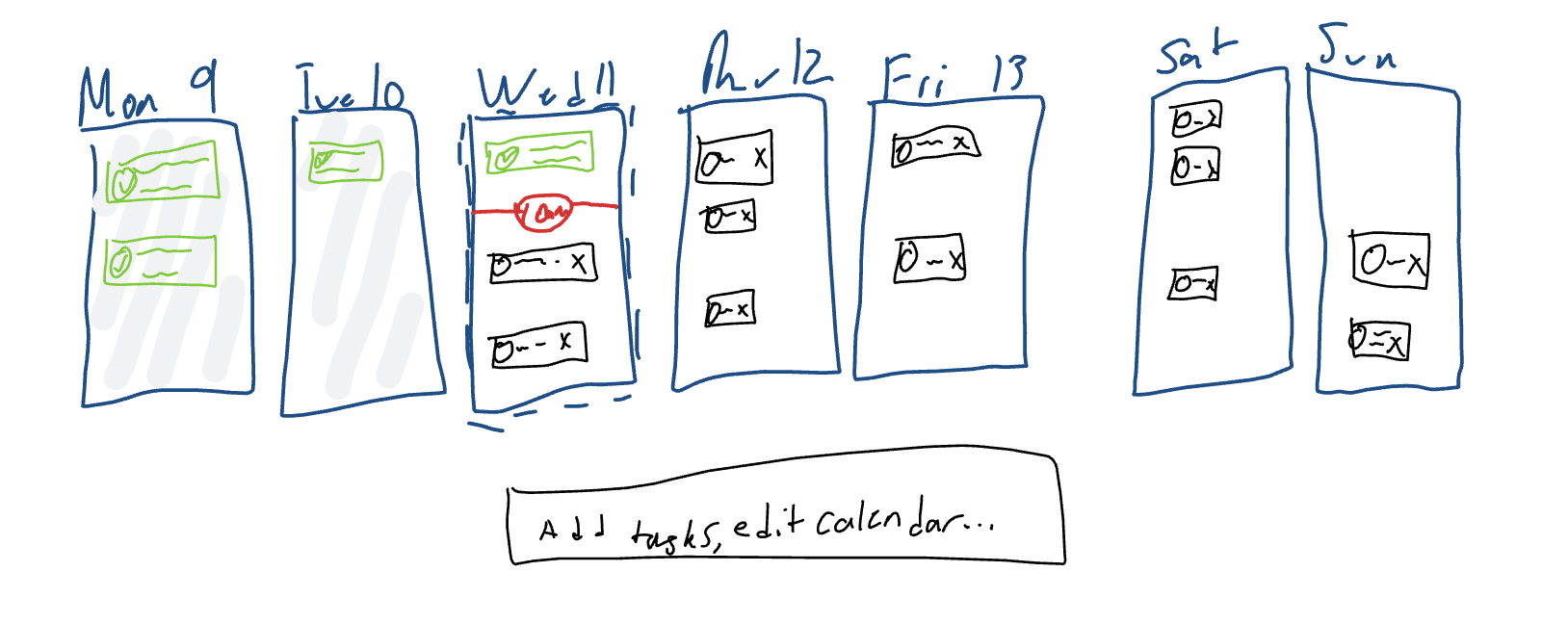
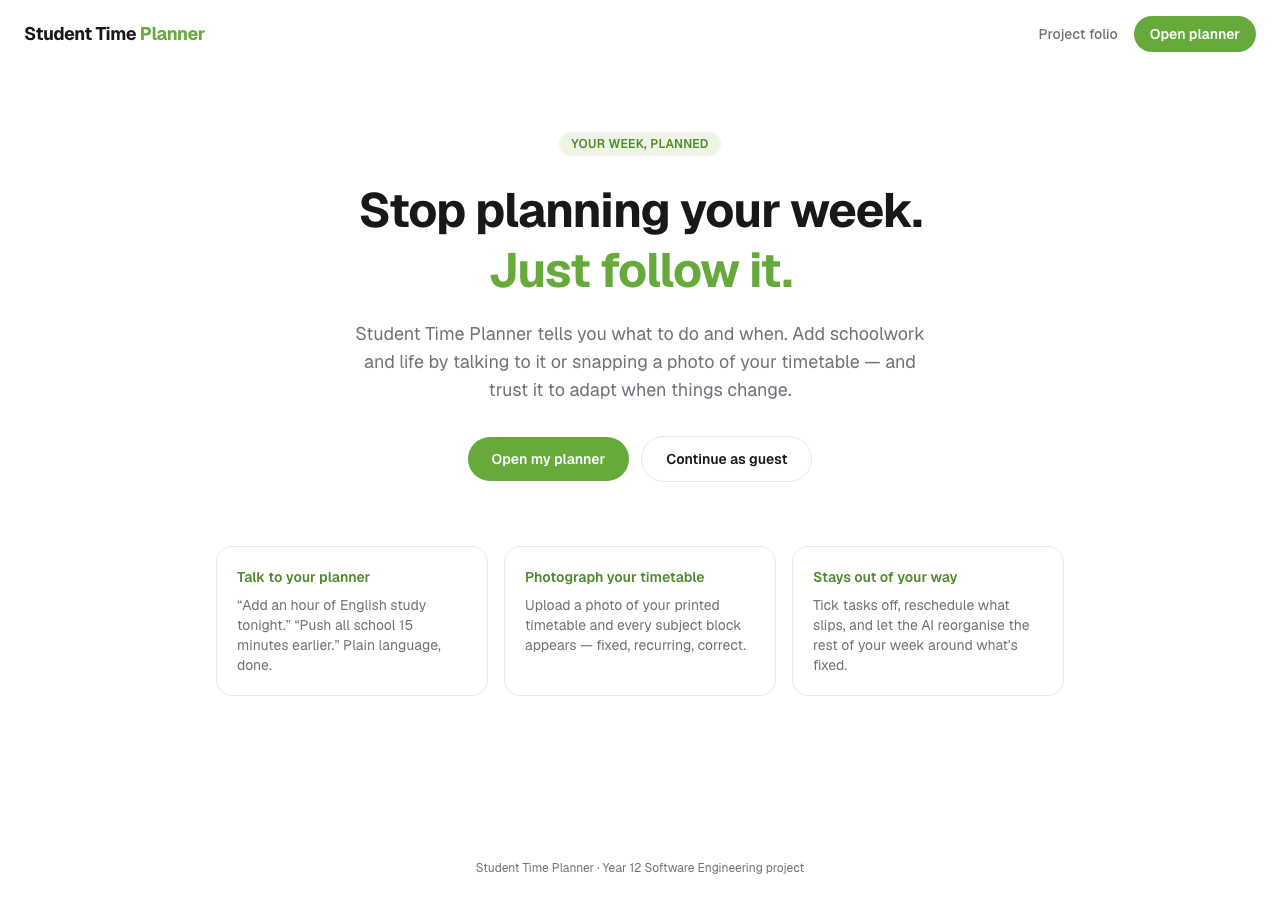
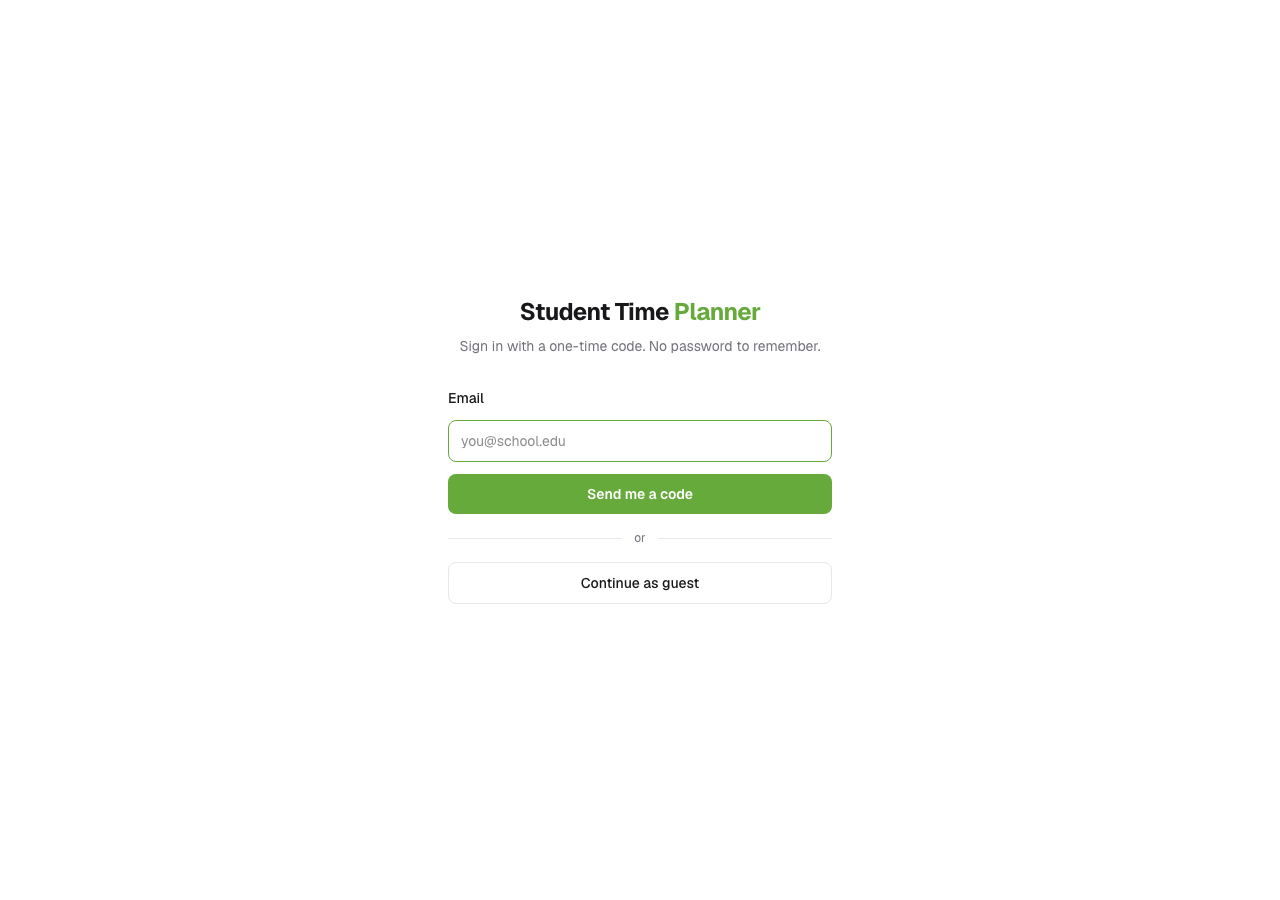
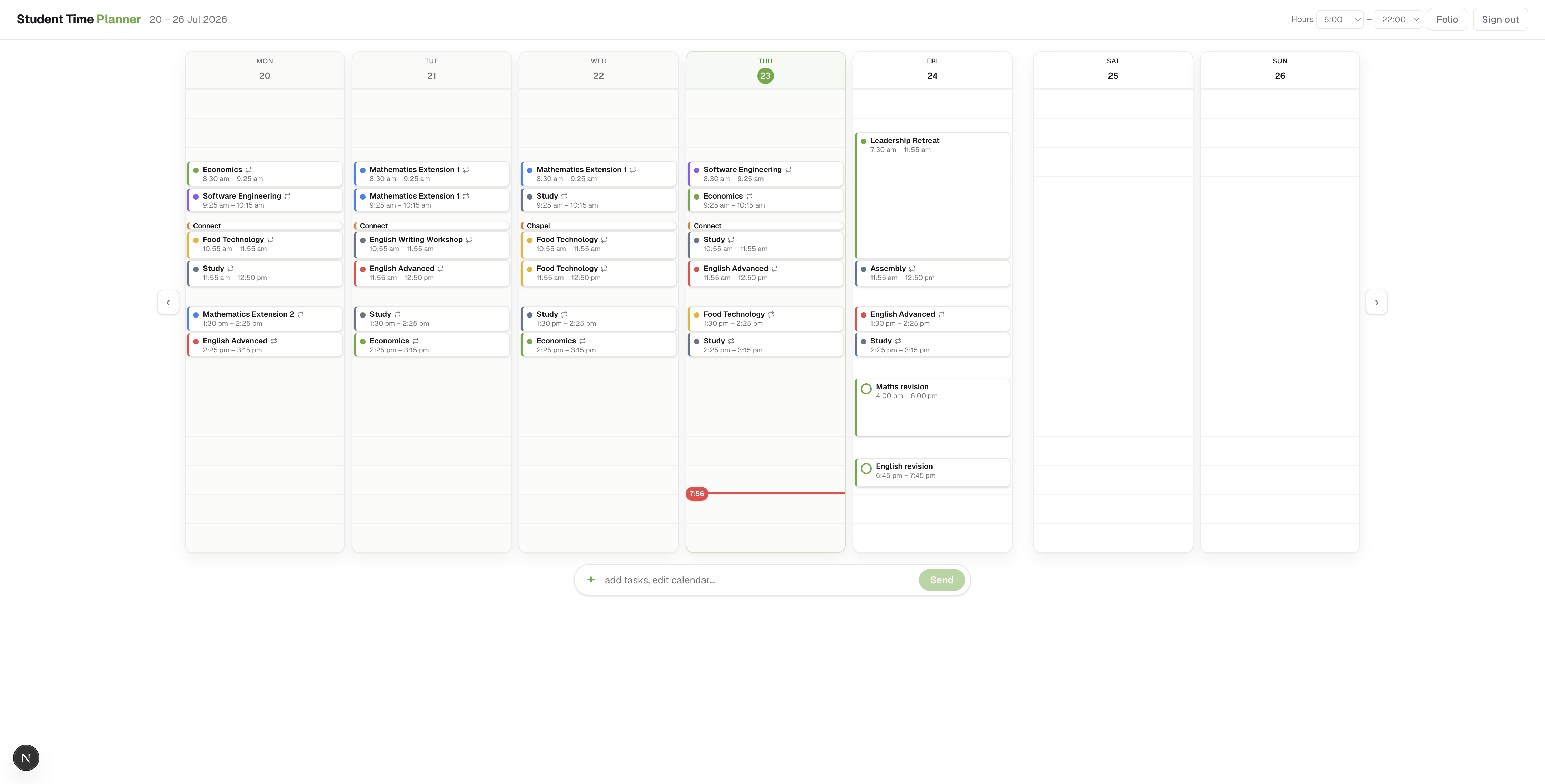
Optional extras if time allows: an AI clarification reply and the timetable review table before confirm — drop PNGs into public/folio/ and they can be captioned the same way.
Backend screenshots
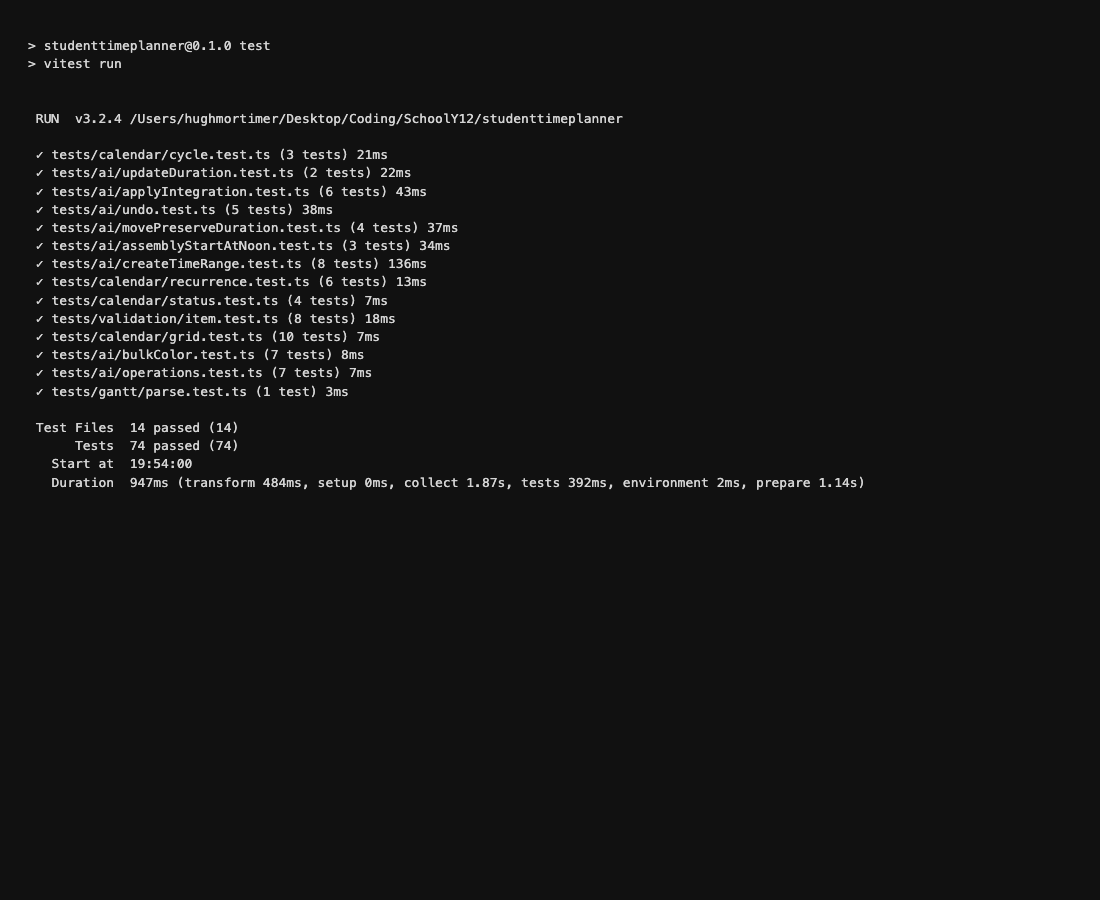
npm test run (14 files, 74 tests passed) covering recurrence, status, Zod validation, and AI apply integration with mocked persistence.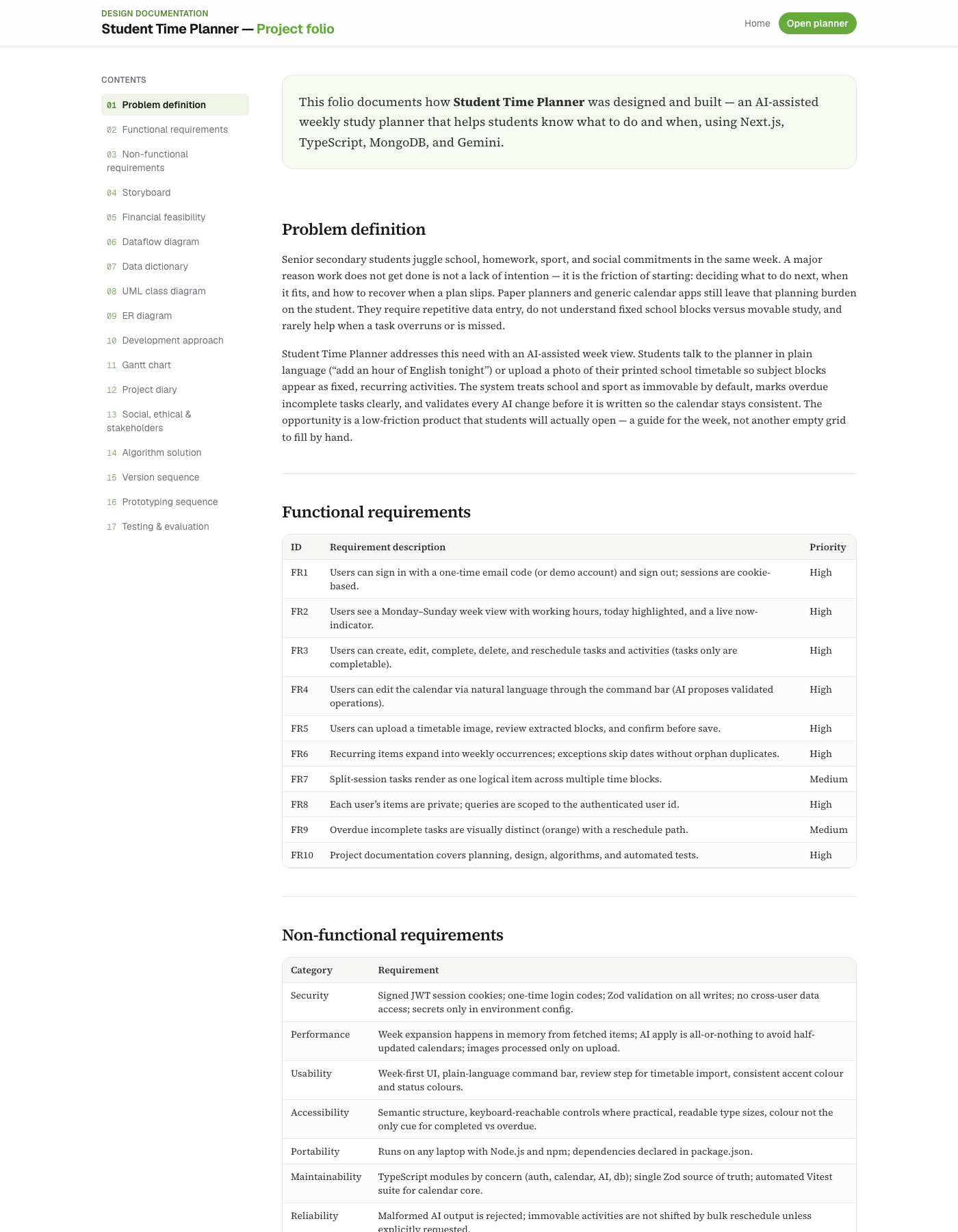
/folio), including data-design diagrams that mirror the Mongo collections used by the API.Automated testing, optimisation & evaluation
Automated tests prove the calendar core and AI apply pipeline behave as specified. Fixtures act as premade calendar items. Unit suites expand them for a frozen “now” and assert occurrences, statuses, grid geometry, and Zod shapes. Integration suites drive applyAiResponse with mocked persistence to prove validate→write behaviour (including all-or-nothing rejection). No manual steps and no API keys are required for npm test.
How to run
npm install
npm test
Result recorded for evidence (23 Jul 2026): the suite reports all tests passed across unit and integration files.
Test Files  14 passed (14)
     Tests  74 passed (74)
   Duration  ~1.1s
Use npm run test:watch during development. npm test runs once and exits (suitable for demos). A screenshot of this run is in Prototyping (Figure B1).
Unit testing coverage
| Suite | Tests | What is tested |
|---|---|---|
| tests/calendar/recurrence.test.ts | 6 | Weekly school series, exceptions, overrides, split sessions, fortnightly interval |
| tests/calendar/status.test.ts | 4 | Overdue / done / upcoming; activities not completable |
| tests/calendar/grid.test.ts | 10 | blockPosition heights; overlapping lane assignment; clamp to working hours |
| tests/calendar/cycle.test.ts | 3 | Day 1–10 → weekday + Week A/B; fortnightly recurrence helper |
| tests/validation/item.test.ts | 8 | Zod accepts valid creates; rejects illegal shapes and boundaries |
| tests/ai/operations.test.ts | 7 | AI response/operation schema rejects malformed ops |
| tests/ai/bulkColor.test.ts | 7 | Bulk colour updates; invalid hex rejected |
| tests/ai/createTimeRange.test.ts | 8 | Create with explicit start/end ranges and noon defaults |
| tests/ai/assemblyStartAtNoon.test.ts | 3 | Assembly / vague morning phrasing resolves to noon start |
| tests/ai/movePreserveDuration.test.ts | 4 | Move keeps duration unless end is explicitly changed |
| tests/ai/undo.test.ts | 5 | Undo snapshot detect / apply restore paths |
| tests/gantt/parse.test.ts | 1 | Gantt date helpers for folio chart |
Integration testing coverage
Integration tests sit above pure schema checks: they run the AI apply module end-to-end with the database layer mocked, so create / update / delete / reject paths exercise the real planning logic without needing MongoDB or Gemini.
| Suite | Tests | What is tested |
|---|---|---|
| tests/ai/applyIntegration.test.ts | 6 | Valid create writes; mixed valid+invalid batch writes nothing; immovable school not bulk-shifted; delete; clarification with empty ops |
| tests/ai/updateDuration.test.ts | 2 | applyAiResponse → updateItem patch for duration resize; empty update still rejected |
Sample expected vs actual (including boundaries)
| Test case | Input (fixture) | Expected | Actual |
|---|---|---|---|
| Weekday school expansion | Recurring Mon–Fri 08:30–15:00 | 5 occurrences in a Mon–Sun week | Pass (unit) |
| Skip exception | Same series + exception on Wednesday | 4 occurrences; Wed absent | Pass (unit) |
| Overdue task | Yesterday’s incomplete task; now = Wed noon | status = overdue | Pass (unit) |
| Duration update | Essay 1 Aug 16:00–17:00; minutes=240 | End becomes 20:00 (4 hours) | Pass (integration) |
| All-or-nothing batch | Valid create + update missing id | ok=false; no DB writes | Pass (integration) |
| Invalid item (boundary) | Both segments and recurrence set | Zod failure | Pass (unit) |
| Empty title (boundary) | title = "" | Zod rejection; no write | Pass (unit) |
| Colour regex (boundary) | color = "green" (not #RRGGBB) | Zod rejection | Pass (unit / bulkColour) |
| Zero-length block (boundary) | segmentEnd = segmentStart | Rejected (end must be after start) | Pass (unit) |
| Immovable bulk shift (boundary) | bulkShift school activity without explicit allow | No write; error surfaced | Pass (integration) |
Optimisation
- Validate AI output before any database write; fail closed on bad data.
- Expand occurrences in memory for the visible week only — not the entire series history.
- Clamp grid positions to working hours so off-hours blocks do not break layout.
- Reject unknown item ids early so Gemini hallucinations never touch storage.
- Automated suite runs in ~1s locally, so regressions are cheap to catch on every change.
Performance and accessibility checks
Assessment resources list PageSpeed Insights and the W3C WAI evaluation tools list. For this project:
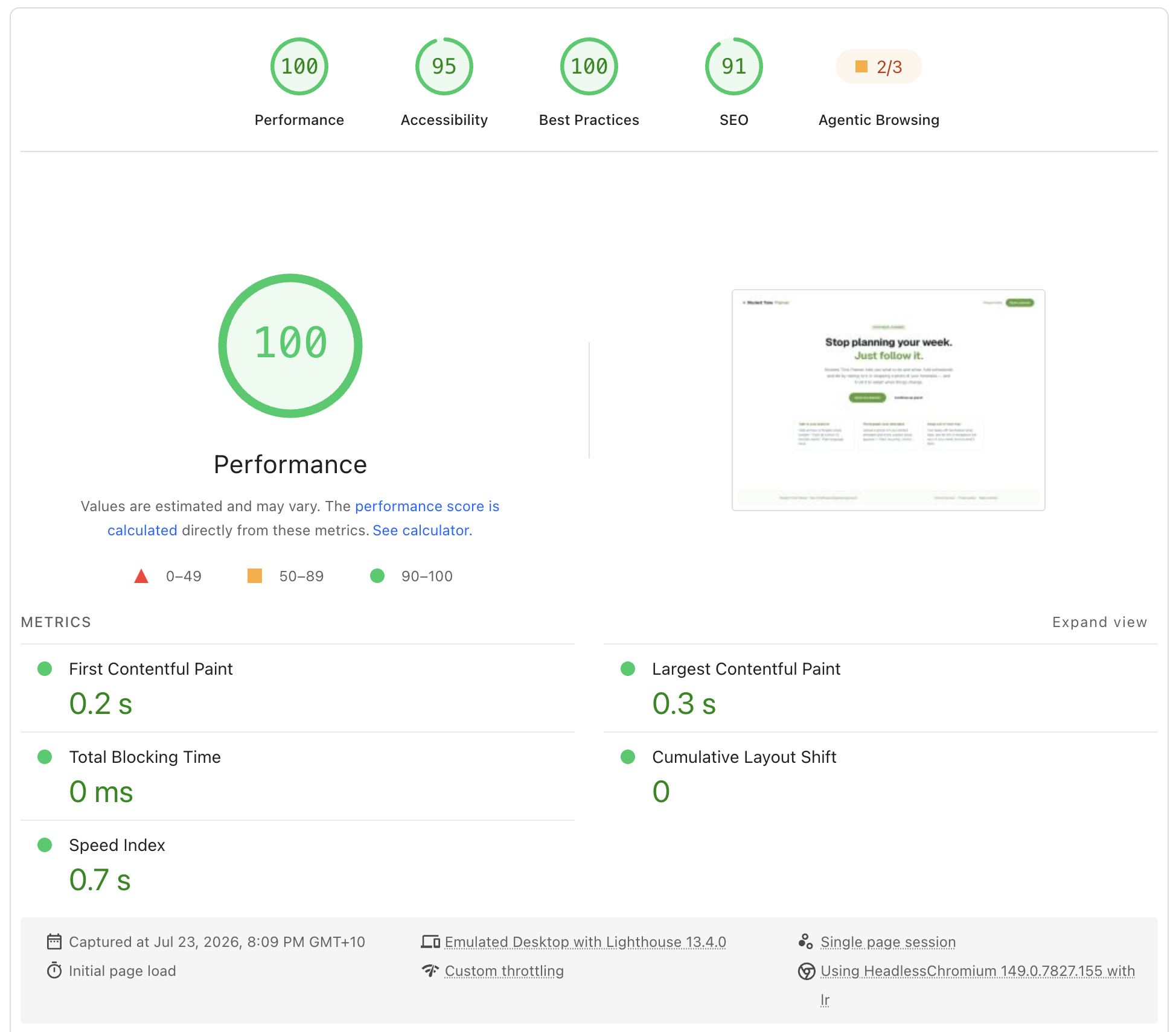
- PageSpeed Insights (desktop, 23 Jul 2026): landing page scored Performance 100, Accessibility 95, Best Practices 100, SEO 91 (Lighthouse 13.4). Core Web Vitals: FCP 0.2s, LCP 0.3s, TBT 0ms, CLS 0, Speed Index 0.7s — well above the ≥80 performance target.
- Accessibility: semantic headings on folio and planner chrome; colour is not the only cue for completed (checkmark) vs overdue (label + orange); keyboard reaches login fields and primary buttons. Remaining gap: deeper screen-reader labels on the command bar and item modal — noted for future polish rather than claimed complete.
Feedback analysis and response
Manual AI prompts are logged in docs/calendarQueryTestCases.md. Section 12 is a regression log of real failed prompts. Example:
| Feedback / failure | Analysis | Response |
|---|---|---|
| “make … on 1 August be like 4 hours” → “Nothing to update on that item.” | Model sent updateItem with duration fields; apply only accepted title/colour/notes. | Extended updateItem to accept minutes/timeEnd; added updateDuration + integration tests; documented case 12.1. |
| Model invents item ids or returns mixed good/bad ops | Partial writes would corrupt the week. | All-or-nothing apply + id existence checks; covered by applyIntegration tests. |
| Blurry timetable photos invent subjects | Vision model is not ground truth. | Mandatory TimetableReview confirm step; cancel writes nothing. |
Evaluation
Against the functional requirements: FR1–FR9 are implemented in the running app; FR10 is this folio. Automated unit and integration tests (74 cases) give regression evidence for recurrence, status, validation, duration updates, undo, and safe AI apply (FR3, FR6, FR8, FR9). Remaining risks include Gemini variability on poor timetable photos — mitigated by the review UI and Zod layer — and free-tier email limits in production, mitigated by the demo login path for marking. UI/E2E browser automation is not yet in the suite; critical paths are covered at the domain and apply-pipeline layers instead.